
How Push Notifications Work?

1 min read
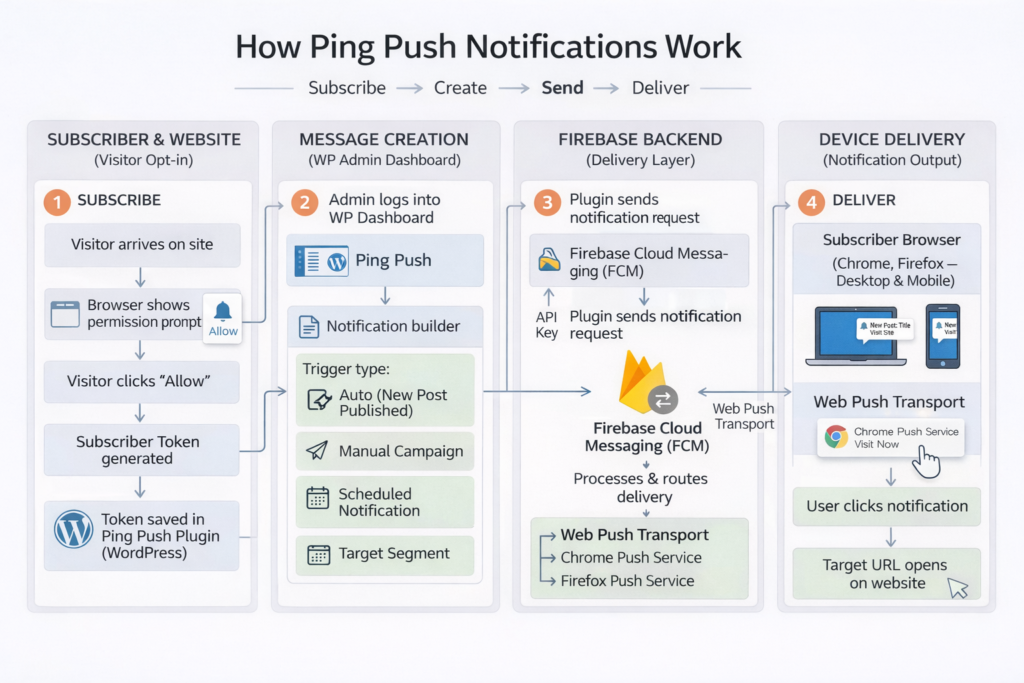
When a visitor lands on your website, a small prompt appears on their browser asking if they would like to receive notifications. If they click Allow, they become your subscriber.
From that point on, whenever you send a notification, whether manually or automatically, it appears as a small pop-up message on their screen. Clicking the notification takes them to a page of your choice, such as a new blog post, a product page or a promotional offer.
How are Notifications Delivered? #
Notifications are delivered through Google Firebase Cloud Messaging, also known as FCM. This is a free service provided by Google and it is what actually sends the notification from your website to your subscriber’s screen.
This is why a Firebase account is required during the setup process. Once it is connected, everything works in the background automatically.
What Devices and Browsers Support Push Notifications? #
Push notifications work on most modern browsers including Chrome and Firefox, on both desktop and mobile devices.
One important thing to note is that your website must be running on HTTPS for push notifications to work. If your site is still on HTTP, push notifications will not function. Contact your hosting provider if you need help switching to HTTPS.